用JavaScript来实现Tab点击切换
AI 摘要 / TL;DR
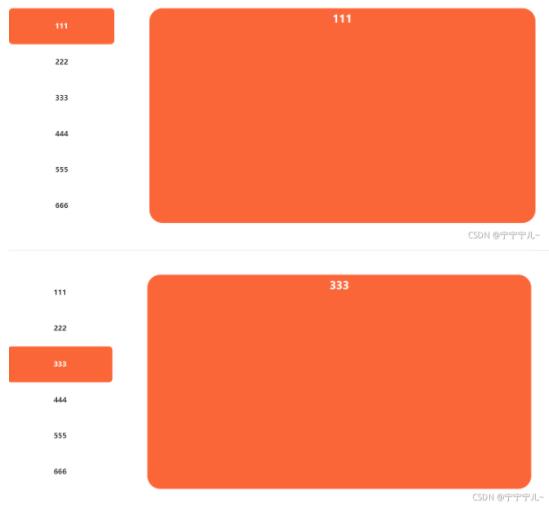
现在很多都用到Tab 选项卡切换效果,例如点击切换、滑动切换、延迟切换、自动切换等多种效果,本篇文章讲述的就是通过原生 Jquery 来实现 Tab 点击切换的效果。 例如: html css js
来源: https://www.ucloud.cn/yun/128200.html 作者: 3403771864 发布日期: 发布于2022-10-24 21:40
现在很多都用到Tab 选项卡切换效果,例如点击切换、滑动切换、延迟切换、自动切换等多种效果,本篇文章讲述的就是通过原生 Jquery 来实现 Tab 点击切换的效果。
例如:
html
  <body>
  <div style="position: relative;margin-top: 56px;display: flex;justify-content: space-between;width: 1200px;" id="left">
  <ul class="gw_b_tab">
  <li class="gw_b_item gw_b_item2">111</li>
  <li class="gw_b_item">222</li>
  <li class="gw_b_item">333</li>
  <li class="gw_b_item">444</li>
  <li class="gw_b_item">555</li>
  <li class="gw_b_item">666</li>
  </ul>
  <div>
  <div class="gw_b_box" style="display: block;">
  <h3 class="gw_box_tit">111</h3>
  </div>
  <div class="gw_b_box" >
  <h3 class="gw_box_tit">222</h3>
  </div>
  <div class="gw_b_box">
  <h3 class="gw_box_tit">333</h3>
  </div>
  <div class="gw_b_box" >
  <h3 class="gw_box_tit">444</h3>
  </div>
  <div class="gw_b_box">
  <h3 class="gw_box_tit">555</h3>
  </div>
  <div class="gw_b_box" >
  <h3 class="gw_box_tit">666</h3>
  </div>
  </div>
  </div>
css
 *{
  padding: 0;
  margin: 0;
  }
  li{
  list-style: none;
  }
  .gw_b_tab{
  color: #333333;
  width: 240px;
  height: 490px;
  background: #FFFFFF;
  border-radius: 8px;
  overflow: hidden;
  overflow-y: hidden;
  }
  .gw_b_item{
  height: 82px;
  padding: 0 22px;
  position: relative;
  font-size: 16px;
  line-height: 80px;
  text-align: center;
  cursor: pointer;
  border-radius: 8px;
  font-weight: bold;
  white-space: nowrap;
  }
  .gw_b_box{
  /* display: none; */
  width: 880px;
  position: absolute;
  right: 0;
  top: 0;
  display: none;
  background: #FB6638;
  height: 490px;
  border-radius: 30px;
  }
  .gw_b_item2{
  background-color: #FB6638;
  color: #fff;
  }
  .gw_box_tit{
  height: 48px;
  line-height: 48px;
  font-size: 24px;
  color: #ffffff;
  margin-bottom: 18px;
  text-align: center;
  }
js
  <script src="/static/js/jquery-1.11.3.min.js"></script>
  <script>
  $(function () {
  $("#left .gw_b_item").click(function () {
  var index = $(this).index();
  $(".gw_b_box").eq(index).show();
  $(this).addClass('gw_b_item2')
  // :eq() 选择器选取带有指定 index 值的元素。
  $(".gw_b_box").eq(index).siblings().hide();
  $(this).siblings().removeClass('gw_b_item2')
  })
  })
  </script>